
121 lines
3.8 KiB
Markdown
121 lines
3.8 KiB
Markdown
<p align="center" style="margin-top: 12px">
|
|
<a href="https://splitpro.app">
|
|
<img width="100px" style="border-radius: 50%;" src="https://splitpro.app/logo_circle.png" alt="SplitPro Logo">
|
|
</a>
|
|
|
|
<h1 align="center">SplitPro</h1>
|
|
<h2 align="center">An open source alternative to Splitwise</h2>
|
|
|
|
<p align="center">
|
|
<a href="https://splitpro.app"><strong>To our App »</strong></a>
|
|
<br />
|
|
<br />
|
|
</p>
|
|
</p>
|
|
|
|
## About
|
|
|
|
SplitPro aims to provide an open-source way to share expenses with your friends.
|
|
|
|
It's meant to be a complete replacement for Splitwise.
|
|
|
|
It currently has most of the important features.
|
|
|
|
- Add expenses with an individual or groups
|
|
- Overall balances across the groups
|
|
- Multiple currency support
|
|
- Upload expense bills
|
|
- PWA support
|
|
- Split expense unequally (share, percentage, exact amounts, adjustments)
|
|
- Push notification
|
|
- Download your data
|
|
- Import from splitwise
|
|
|
|
**More features coming every day**
|
|
|
|
---
|
|
|
|
## Why
|
|
|
|
Splitwise is one of the best apps to add expenses and bills.
|
|
|
|
I understand that every app needs to make money, After all, lots of effort has been put into Splitwise. My main problem is how they implemented this.
|
|
|
|
Monetising on pro features or ads is fine, but asking money for adding expenses (core feature) is frustrating.
|
|
|
|
I was searching for other open-source alternatives (Let's be honest, any closed-source product might do the same and I don't have any reason to believe otherwise).
|
|
|
|
I managed to find a good app [spliit.app](https://spliit.app/) by [Sebastien Castiel](https://scastiel.dev/) but it's not a complete replacement and didn't suit my workflow sadly. Check it out to see if it fits you.
|
|
|
|
_That's when I decided to work on this_
|
|
|
|
## Tech stack
|
|
|
|
- [NextJS](https://nextjs.org/)
|
|
- [Tailwind](https://tailwindcss.com/)
|
|
- [tRPC](https://trpc.io/)
|
|
- [ShadcnUI](https://ui.shadcn.com/)
|
|
- [Prisma](https://www.prisma.io/)
|
|
- [Postgres](https://www.postgresql.org/)
|
|
- [NextAuth](https://next-auth.js.org/)
|
|
|
|
## Getting started.
|
|
|
|
### Prerequisites
|
|
|
|
- Node.js (Version: >=18.x)
|
|
- PostgreSQL
|
|
- pnpm (recommended)
|
|
|
|
## Docker
|
|
|
|
We provide a Docker container for Splitpro, which is published on both DockerHub and GitHub Container Registry.
|
|
|
|
DockerHub: [https://hub.docker.com/r/ossapps/splitpro](https://hub.docker.com/r/ossapps/splitpro)
|
|
|
|
GitHub Container Registry: [https://ghcr.io/oss-apps/splitpro](https://ghcr.io/oss-apps/splitpro)
|
|
|
|
You can pull the Docker image from either of these registries and run it with your preferred container hosting provider.
|
|
|
|
Please note that you will need to provide environment variables for connecting to the database, redis, aws and so forth.
|
|
|
|
For detailed instructions on how to configure and run the Docker container, please refer to the Docker [Docker README](./docker/README.md) in the docker directory.
|
|
|
|
## Developer Setup
|
|
|
|
### Install Dependencies
|
|
|
|
```bash
|
|
corepack enable
|
|
```
|
|
|
|
```bash
|
|
pnpm i
|
|
```
|
|
|
|
### Setting up the environment
|
|
|
|
- Copy the env.example file into .env
|
|
- Setup google oauth required for auth https://next-auth.js.org/providers/google or Email provider by setting SMTP details
|
|
- Login to minio console using `splitpro` user and password `password` and [create access keys](http://localhost:9001/access-keys/new-account) and the R2 related env variables
|
|
|
|
### Run the app
|
|
|
|
```bash
|
|
pnpm d
|
|
```
|
|
|
|
## Sponsors
|
|
|
|
We are grateful for the support of our sponsors.
|
|
|
|
### Our Sponsors
|
|
|
|
<a href="https://hekuta.net/en" target="_blank">
|
|
<img src="https://avatars.githubusercontent.com/u/70084358?v=4" alt="hekuta" style="width:60px;height:60px;">
|
|
</a>
|
|
|
|
## Star History
|
|
|
|
[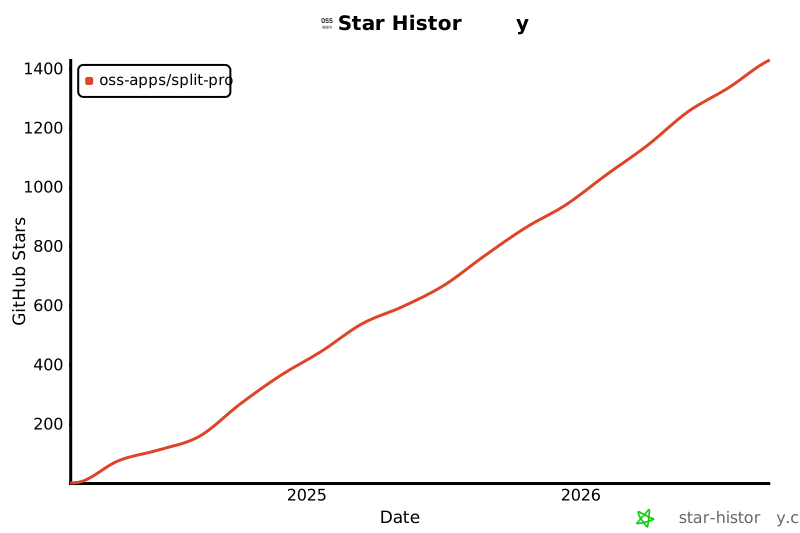](https://star-history.com/#oss-apps/split-pro&Date)
|